Fund Your Hyperliquid Account
No USDC on Hyperliquid yet? Get USDC (not USDC.e) and a little ETH on Arbitrum, from an exchange or from Ethereum, then deposit with MetaMask on Hyperliquid. Step by step, for you or your AI assistant.
WakeTrades copies trades on your own Hyperliquid account, so that account needs USDC first. There's one way in: get USDC on the Arbitrum network, then click Deposit on Hyperliquid, with MetaMask.
Prefer to be guided? Copy this message into ChatGPT, Claude or Grok.
Before You Start
- Check that WakeTrades is available where you live, before you move any money: Where Is WakeTrades Available?
- One MetaMask account for everything. Your Hyperliquid account is your MetaMask address. Use the same account to receive the USDC, to deposit, and later to connect on WakeTrades. Get MetaMask if you don't have it.
- How much USDC? Your balance decides your level: at least 300 USDC for Risky, 550 for Balanced, 1,100 for Prudent (why). Fees take a little on the way, so send a bit more. Only money you can afford to lose.
- About 5 USD of ETH on Arbitrum. Each transaction on Arbitrum costs a few cents in ETH; 5 USD covers the deposit and the ones after.
USDC, not USDC.e. Arbitrum has two kinds of USDC. Hyperliquid takes only USDC (native USDC, contract 0xaf88…5831). Sent as USDC.e, it won't work on Hyperliquid.
Pick Your Starting Point
| Your money is… | Go to | Time |
|---|---|---|
| On an exchange | 1. From an exchange, then 3. Deposit | A few minutes |
| In MetaMask, on Ethereum | 2. From Ethereum, then 3. Deposit | A few minutes |
| In MetaMask, on Arbitrum | 3. Deposit | About a minute |
Times are estimates.
1. From an Exchange
- In MetaMask, copy your address: click your account name at the top, then the copy icon. It starts with
0x. - On your exchange, buy USDC, and about 5 USD of ETH.
- Withdraw the ETH to your address. For the network, choose Arbitrum One.
- Withdraw the USDC the same way, on Arbitrum One. Check the network before you confirm: sent on another network, it doesn't arrive on Arbitrum.
- In MetaMask, switch to the Arbitrum network. Your ETH and USDC show up within a few minutes. Arbitrum not in your list? Add it from MetaMask's network menu.
Next: 3. Deposit on Hyperliquid.
2. From Ethereum to Arbitrum
Your money is in MetaMask on Ethereum. Keep some ETH there: each move costs a network fee on Ethereum, often a few dollars. Two ways to move it:
With the Arbitrum Bridge (lowest fees)
- Go to portal.arbitrum.io/bridge and connect MetaMask.
- Move about 5 USD of ETH first: From: Ethereum, token ETH, To: Arbitrum One. Click Move funds to Arbitrum One and confirm in MetaMask.
- Then the USDC: token USDC on both sides, and enter the amount.
- Under Receive, choose the line that gives USDC, not the one that gives USDC.e. Each line shows its time and fee.
- Click Move funds to Arbitrum One and confirm in MetaMask.
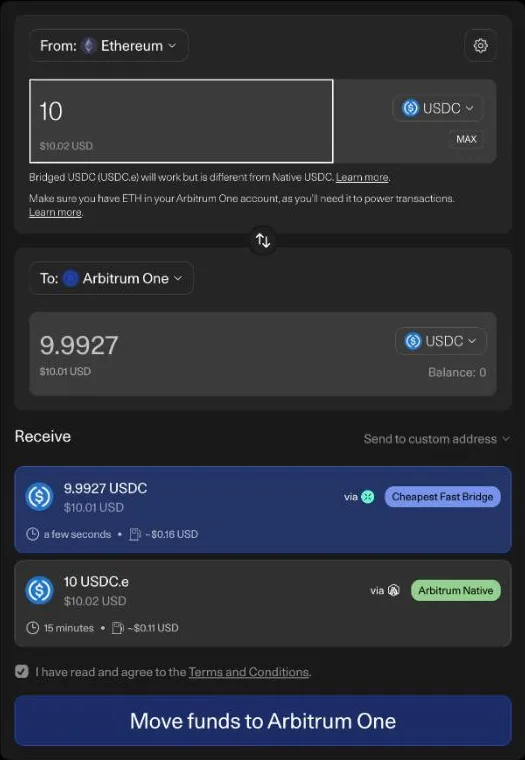
With MetaMask Swap (no other site)
- In MetaMask, click Swap.
- From: ETH on Ethereum. To: ETH on Arbitrum. Swap about 5 USD worth.
- Then from: USDC on Ethereum. To: USDC on Arbitrum. Only have ETH? Swap from ETH on Ethereum to USDC on Arbitrum instead.
- Review the quote and confirm. It includes MetaMask's fee (0.875% today) and the network fees.
Next: 3. Deposit on Hyperliquid.
3. Deposit on Hyperliquid
- Go to app.hyperliquid.xyz. Click Connect (top right) and choose MetaMask, with the same account.
- If Hyperliquid shows Enable Trading, click it and sign in MetaMask. It's free and sends no transaction.
- Click Deposit (top right). The window Deposit USDC from Arbitrum opens: Asset USDC, Deposit Chain Arbitrum.
- Enter the Amount: at least 5 USDC. Hyperliquid deducts a small fee, shown in the window (0.2 USDC today).
- Click Deposit and confirm in MetaMask. Your USDC shows on Hyperliquid in about a minute.
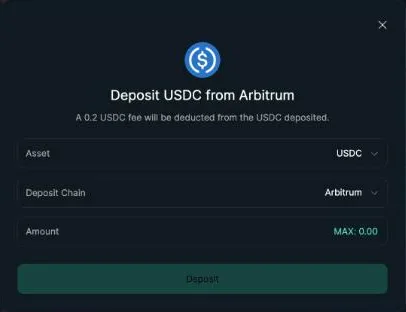
Hyperliquid says a deposit under 5 USDC is never credited and is lost.
Then, on WakeTrades
Go to waketrades.com and follow the Quick Start with the same MetaMask account. If the deposit is still on its way, you can already choose your level and your leader. Hyperliquid accepts the trading key once the USDC has arrived.
Ask Your AI Assistant
Paste this message into ChatGPT, Claude, Grok or any assistant that can read web pages. You sign each step yourself in MetaMask.
Help me fund my Hyperliquid account so I can use WakeTrades.
Follow this guide step by step: https://waketrades.com/docs/getting-started/fund-hyperliquid-account.md
First check with me that WakeTrades is available where I live: https://waketrades.com/help#where-is-it-available
Then ask me where my money is now (an exchange, MetaMask on Ethereum, or MetaMask on Arbitrum), which WakeTrades level I plan to use, and how much I want to deposit.
Give me one step at a time and wait until I confirm it's done.
Make sure I get native USDC on Arbitrum, not USDC.e.
Never ask for my seed phrase or private key: I sign every transaction myself in MetaMask.
Common Questions
| Question | Answer |
|---|---|
| Does WakeTrades hold my USDC? | No. It stays on your Hyperliquid account. The trading key can trade for your copies and can never withdraw. |
| I got USDC.e by mistake. | In MetaMask, Swap it for USDC on Arbitrum, then deposit. |
| I deposited from another wallet. | The USDC is on that wallet's Hyperliquid account. Connect that wallet on WakeTrades, or move the USDC to your account with Send on Hyperliquid. |
| My deposit doesn't show up. | Check in MetaMask that the transaction succeeded on Arbitrum, and that you sent USDC (not USDC.e), at least 5. |
| Can I withdraw later? | Yes, on Hyperliquid, whenever you want: Withdraw, back to Arbitrum. WakeTrades can't withdraw or block it. |
For an AI Agent With Its Own Wallet
This part is for an AI agent that holds its own wallet, not for you. The agent signs nothing to get funded: its owner funds their own Hyperliquid account as above, then sends USDC to the agent's address on Hyperliquid (Send, in the owner's Hyperliquid account). Hyperliquid charges the sender 1 USDC the first time an address receives a transfer.
The agent checks that the USDC shows on its Hyperliquid account, then follows WakeTrades for AI Agents. Our agent wallet skill has the message to send to the owner.