Your Dashboard
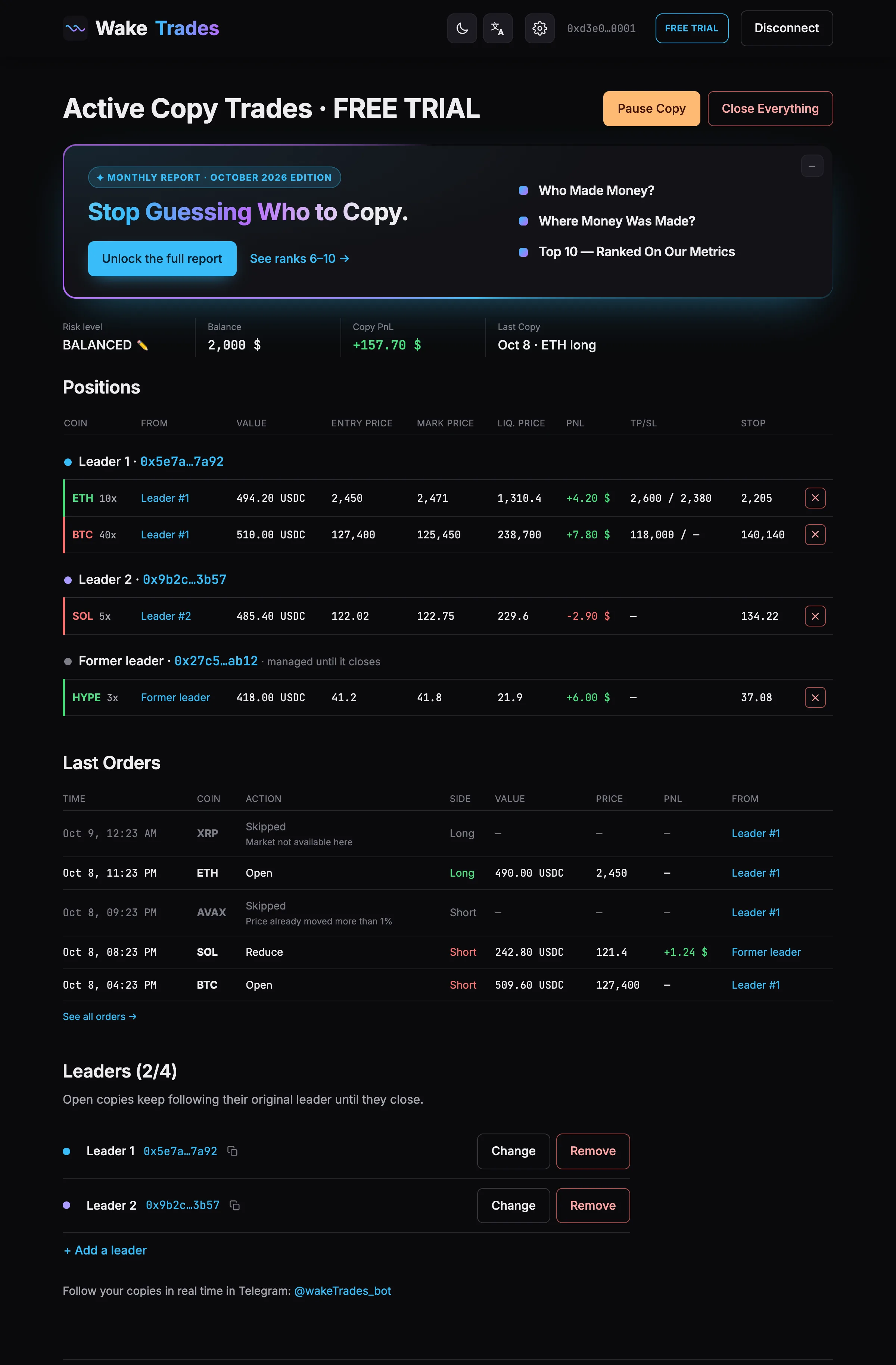
Your WakeTrades dashboard — copy status, balance, copy PnL, copied positions grouped by leader, last orders and your leaders.
The dashboard is your home once copying is on. Open it from Dashboard on any page, or from the link the bot sends you.
Status and Controls
The title tells you where copying stands — Active Copy Trades, Paused, Trial ended… — with your plan next to it. On the right, Pause Copy and Close Everything: see Pause, Resume and Close.
Monthly Report
At the top, the Monthly Report card: who made money, where money was made and the traders worth copying for each exposure level. Once you open the report from it, or click −, it shrinks to a single Open Monthly Report button until the next report comes out, then opens again by itself.
Summary
| Box | What it shows |
|---|---|
| Exposure level | Your current level. The ✏️ opens Change Your Exposure Level. |
| Balance | Your Hyperliquid account value. |
| Copy PnL | The result of your copies since you started, closed and open. Your own trades on this account are not counted. |
| Last Copy | The date, coin and side of your last copied trade. |
Positions
Your copied positions, grouped by leader. A position from a leader you removed stays under Former leader and is managed until it closes.
The Limit orders · lower fees switch above the table sets how new copies enter: at market, or with a limit order at your leader's price (see Market or Limit Orders). A limit order still waiting shows as a grey row, Waiting at …; its ✕ cancels the order.
| Column | Meaning |
|---|---|
| Coin | The market, in green for a long and red for a short, with your leader's leverage. |
| From | The leader it was copied from, with the name you gave it (Rename a Leader). Click it to open the leader's page. |
| Value | The size of your copy, in USDC. |
| Entry price · Mark price · Liq. price | Your entry, the current price and your liquidation price. |
| PnL | The open result of this copy. |
| TP | The take profit on your copy, copied from your leader (same price, same share). “+1” means one more further away. |
| SL | The stop loss on your copy, copied from your leader. None if your leader has none: no level adds a stop of its own. |
| ✕ | Closes this copy at market, after a confirmation. |
Last Orders and Leaders
Last Orders shows your 3 most recent copy orders, including the trades that were skipped and why. See all orders → opens the full list: see Orders and Skipped Trades.
Below, the Monitored Leaders section lists the traders you follow with their numbers over the last 30 days (win rate / drawdown, profit factor, trades per month, holding time, open at once), ✏️ (change), ✕ (remove) and + Add a leader: see Add, Change or Remove a Leader. Click a leader's address to open their page: see Read a Leader's Page.
Banners
A banner appears at the top when something needs you: no USDC yet on your account, a trading key that expires within 30 days, an ended trial or plan, a Telegram account to link again, or a Hyperliquid account that isn't unified (at Prudent, Balanced and Risky, new copies are then on hold; at Advanced, stock, index and commodity markets aren't copied).
Information banners — no Telegram linked, a trading key that expires soon, a plan to renew — have a ✕: closed, they stay hidden for 7 days on this browser, then come back if nothing has changed. Banners that put new copies on hold (positions opened outside WakeTrades, an account that isn't unified, an ended trial or plan) stay until you act. Once you close positions opened outside WakeTrades on Hyperliquid, their banner goes away by itself within 30 seconds.