Quick Start
Start copying a Hyperliquid trader in five steps — connect MetaMask, choose an exposure level and a leader, sign the trading key, link Telegram or skip it.
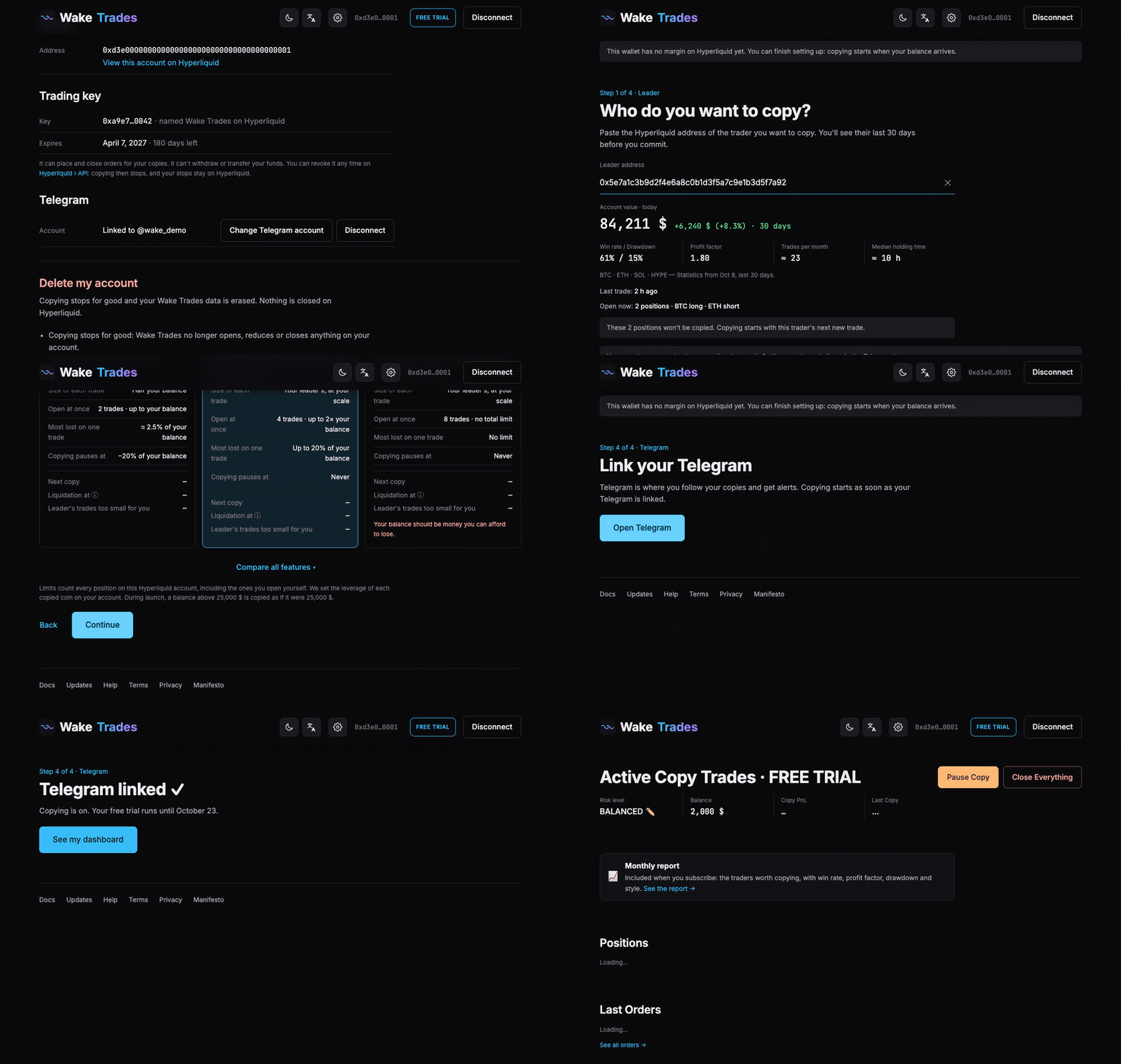
Setup takes about five minutes: a free sign-in message when you connect, then a single signature for the trading key. Nothing more. Here is the whole flow, from the home page to your dashboard:
Before You Start
- MetaMask — the browser extension on a computer, or the MetaMask app on a phone.
- A Hyperliquid account with USDC on it. Hyperliquid only accepts a trading key from an account that has received a deposit.
- Telegram (optional) — for alerts on your phone. You can skip it: copying starts anyway, with alerts on the site only, and you can link Telegram later from your Profile. (An AI agent links a webhook or Telegram.)
- A trader to copy — any Hyperliquid address (it starts with
0x). No trader in mind? We suggest one from our Monthly Report.
The Five Steps
- Connect your wallet. Click Connect wallet and sign in with MetaMask. Signing in is free and sends no transaction.
- Choose your exposure level. Prudent, Balanced (selected by default), Risky or Advanced.
- Choose a leader. Keep the trader we suggest for your level, or paste another address, and check their last 90 or 30 days.
- Sign the trading key. One signature creates a key that can trade for your copies and can never withdraw.
- Link Telegram. Tap Start in our bot, or choose Skip for now. Copying starts, and so does your 14-day free trial.
Only the trades your leader opens after you start are copied. Positions your leader already holds are not.
What Happens Next
When your leader opens a trade, the same trade opens on your account at your scale, with your leader's stop loss and take profit, when they set them. You see it on your dashboard and get a message from the Telegram bot. When your leader trims or closes, your copy follows.